A few years ago, building a website meant briefing a designer, waiting two weeks for mockups, another three weeks for development, and then six rounds of revisions before launch. Today, you can have a working draft of a website with AI in under 30 minutes.
But here’s the catch every expert will tell you the tool isn’t the website. The thinking is.
If you’ve been searching for how to design a website with AI, you’ve probably noticed the internet is now flooded with two kinds of advice: hype-merchants saying “AI will replace designers!” and skeptics saying “AI websites all look the same.” Both are wrong.
The truth lives in the middle and that’s where the experts who actually ship products live too. This guide is a no-fluff walkthrough of how to approach the workflow alongside human designers and developers, the tools, the pitfalls, and the parts you genuinely cannot skip.
Key Stats at a Glance
73% of designers now use AI tools weekly.
2.5x faster delivery on AI-assisted web projects compared to traditional methods.
90 seconds is the average time for an AI website builder to generate a first draft.
What “Designing a Website with AI” Actually Means in 2026
Let’s clear up the confusion first, because the phrase website with AI gets used to mean five different things:
AI-Generated Websites: Tools like Framer AI, Wix Studio AI, and Hostinger Horizons that produce a full site from a text prompt.
AI-Assisted Design: Designers using ChatGPT, Claude, or Midjourney to generate copy, imagery, layouts, and component ideas but assembling the site themselves.
AI-Enhanced Builders: Webflow, Framer, and WordPress with AI plugins that speed up specific tasks like writing alt text, generating sections, or refactoring CSS.
AI-Powered Websites: Sites with embedded AI features such as chatbots, personalization engines, and dynamic content.
End-to-End AI Pipelines: Custom workflows where AI handles research, design, copy, code, QA, and deployment with humans steering at each gate.
Most articles on this topic only cover the first point. The experts work across all five. The real magic what actually produces a website that performs is in combining them, not picking one.
The 7-Step Expert Workflow to Design a Website with AI
Here’s the actual workflow distilled from dozens of successful projects across SaaS, fintech, D2C, and B2B. Each step has a purpose. Skip one, and you’ll feel it at launch.
01. Start with Positioning, Not a Prompt
Before you touch any tool, answer three questions:
Who is this site for?
What’s the one action you want them to take?
What do they need to believe to take it?
If you can’t answer these in two sentences each, no AI tool will save you. The output will be a beautiful, generic site that converts no one.
02. Generate the Structure with AI, Not the Design
Use an AI chat tool to outline your sitemap, page hierarchy, and content blocks before opening a visual builder. Prompt to try: “I’m building a website for [audience] that does [action]. Give me the page structure, key sections per page, and the emotional arc of a first-time visitor’s scroll.”
This step alone removes 80% of the rework that happens later.
03. Pick the Right AI Website Builder for Your Stage
Different tools win at different stages. Such a tool is only as good as your willingness to override it. If you accept the first generated version, you’ll look like every other site that used the same template. The experts treat AI output as a v0.5, not a v1.
04. Layer in AI-Generated Copy with Human Editing
Use AI to draft headlines, subheads, CTAs, and feature descriptions but never publish the first draft. AI-written copy has a clear tell: generic phrasing, “elevate your business” syndrome, and excessive em-dashes. A 15-minute human edit per page is the difference between a site that sounds like your brand and one that sounds like every other automated template.
05. Use AI for ImageryBut Stay On-Brand
Midjourney, DALL-E, and Adobe Firefly can generate stunning hero images, illustrations, and patterns. But pick one visual style and lock it. The biggest amateur mistake is mixing three different AI image styles on one site it screams “I built this in an afternoon.” Define a style guide first, then generate.
06. Add the Human Polish Layer
This is the step that separates expert AI-built websites from amateur ones. After AI gives you a draft: tighten the spacing, fix the typography hierarchy, add the micro-interactions, ensure mobile responsiveness is actually clean (AI builders often fake this), and audit accessibility. The 20% of work that’s still human is what makes 80% of the perceived quality.
07. Use AI to Test, Optimize, and Personalize Post-Launch
Launch isn’t the end it’s where AI gets even more useful. Lean into heatmap analysis, AI-driven A/B testing, dynamic personalization, and AI chatbots for support and lead capture. A modern site doesn’t stop being intelligent after deployment. The best sites in 2026 are the ones that learn and adapt month-over-month.
The AI Website Builder Landscape: What Experts Actually Use
There are now hundreds of tools claiming to be an AI website builder. Most are skinned versions of the same underlying models. Here’s the shortlist of what actually works in 2026, with honest trade-offs:
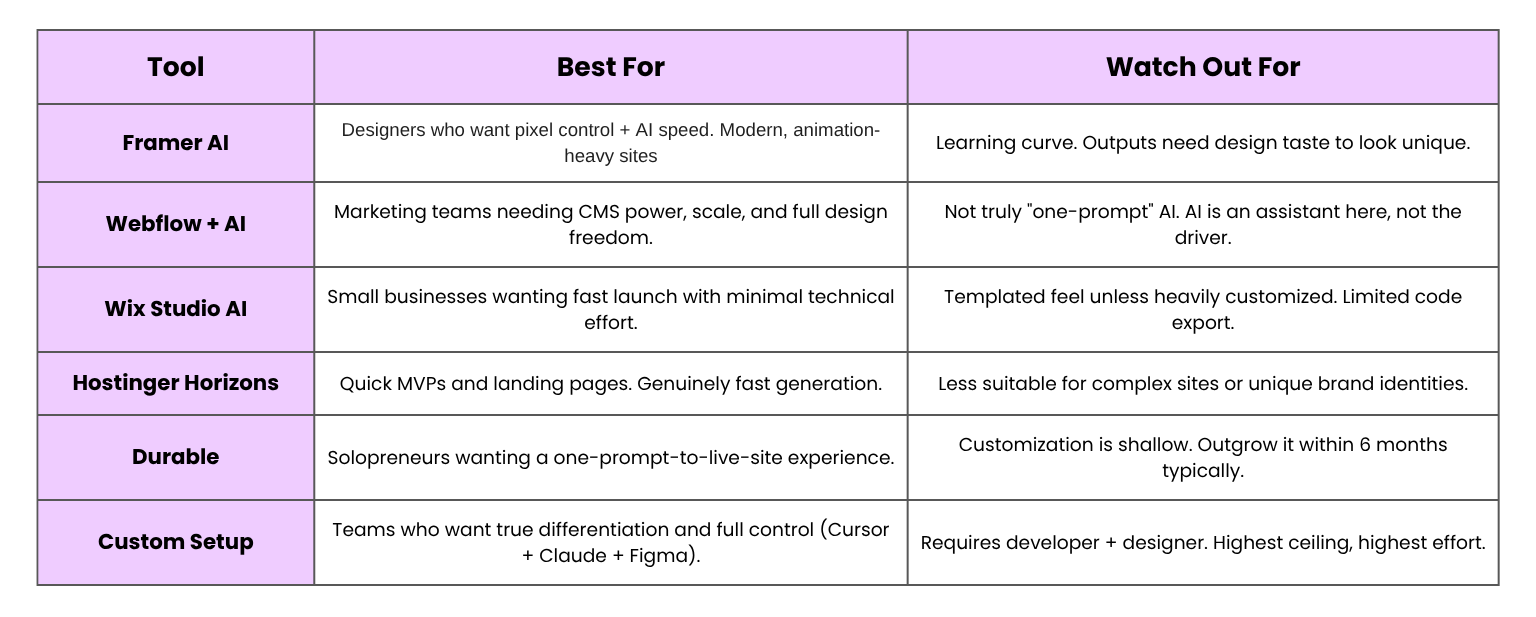
The more you want a site that feels truly yours, the less you should rely on a single tool. The expert workflow stitches multiple tools together.
Common Mistakes to Avoid When You Build a Website with AI
If you avoid these five critical pitfalls, you’re already ahead of 80% of AI-built websites:
Mistake 1: Treating AI like a designer, not a draftsman. AI generates options; it doesn’t make decisions. The moment you outsource choices like your hero statement or brand voice, you hand away the part that makes your site unique. Use AI to expand options, not to choose between them.
Mistake 2: Skipping the content strategy. These tools can lay out beautiful sections but they have no idea what your customer actually needs to read before they convert. Plan the content arc first, then let AI generate the blocks. Doing it backward causes gorgeous designs with zero conversion.
Mistake 3: Believing the “one-prompt to launch” demo. Videos showing a full website built in 30 seconds are doing the same thing fitness influencers do with dramatic before/after photos. Real, high-converting builds take days or weeks, not minutes.
Mistake 4: Ignoring SEO and technical foundations. Most automated tools produce sites with bloated code, poor Core Web Vitals, and weak semantic HTML. Google still cares deeply about this. If you build a website with AI and skip technical SEO, you’ll have a pretty site that nobody ever finds.
Mistake 5: Skipping human review on the final pass. A fresh pair of human eyes reviewing the final site before launch yields the highest ROI. AI consistently misses spelling errors, broken layouts on edge cases, awkward copy formatting, and accessibility gaps. Budget at least one full day for human polish.
Frequently Asked Questions